How to Find Where a Photo Was Taken: EXIF, Visual Clues & AI
A practical guide to EXIF GPS, visual clues, reverse image search, AI photo location finders, and map verification

Table of Contents
- Why Would You Need to Find Where a Photo Was Taken?
- Quick Decision Guide: Which Photo Location Method Should You Use?
- Method 1: Check EXIF Metadata for GPS Coordinates
- Method 2: Visual Clue Analysis — Read the Photo Like a Detective
- Method 3: Reverse Image Search
- Method 4: AI Photo Location Finder — The Most Powerful Method
- How AI Analyzes Photos to Determine Location
- Accuracy: How Reliable Are AI Location Finders?
- Privacy & Safety: What You Should Know
- How to Cross-Check a Photo Location Result
- Frequently Asked Questions
Want to find location from photo, find location from picture, or understand where an image was taken? Start with the original file, check for EXIF GPS, then move through visual clues, reverse image search, AI photo location tools, and map verification. The right method depends on what information the image still contains.
Quick Decision Guide: Which Photo Location Method Should You Use?
Start with the method that matches the file you actually have. The fastest path is different for an original camera file, a social media download, a screenshot, and an old scanned print.
| Photo situation | Start here | Why it works | Next check |
|---|---|---|---|
| Original phone or camera file | Check EXIF/GPS metadata | The file may still contain exact coordinates or a saved place name. | Open the coordinates in Maps and confirm the scene. |
| Social image or screenshot | Use AI visual geolocation | Social platforms usually strip metadata, so visible clues matter more. | Compare landmarks, signs, road layout, and Street View. |
| Old family photo or scan | Look for architecture, landscape, clothing, and printed signs | Historical context narrows the region before AI or map checks. | Search archives or local landmark databases. |
If two methods point to the same city, landmark, or street pattern, the result is stronger than a single AI guess.
Why Would You Need to Find Where a Photo Was Taken?
The reasons are more varied — and more common — than you might think:
You saw a stunning photo online and want to visit that exact spot. Finding the location is the first step to planning your trip.
Years of travel photos with missing or corrupted metadata. AI can help you re-tag and organize your entire library.
Verifying whether a news image was actually taken where and when it's claimed. This is a core skill in modern investigative reporting.
Open-source intelligence analysts use photo geolocation to verify events, track movements, and expose misinformation.
Old family photos often hold clues to your heritage. Finding where they were taken can unlock stories that were never written down.
Understanding how easily a photo's location can be identified helps you make smarter decisions about what you share online.
Method 1: Check EXIF Metadata for GPS Coordinates
Before you do anything else, check the photo's hidden data. Every digital photo carries a file called EXIF (Exchangeable Image File Format) — think of it as a digital fingerprint embedded invisibly inside the image. When your smartphone or GPS-enabled camera takes a picture with location services enabled, it automatically writes the precise GPS coordinates (latitude, longitude, and sometimes altitude) directly into the file.
How to view EXIF data
Windows
Right-click the image file → select Properties → click the Details tab. If GPS data is present, you'll see Latitude and Longitude listed under GPS.
Mac
Open the image in Preview → go to Tools menu → select Show Inspector → click the GPS tab.
iPhone
Open the photo in the Photos app → swipe up or tap the info (ⓘ) icon → a map will appear showing exactly where it was taken.
Android
Open the photo in Google Photos → tap the three-dot menu → Details → scroll down to see location information.
The big limitation: social media strips EXIF data
Here's the catch: almost every major social media platform — Instagram, X (Twitter), Facebook, WhatsApp — automatically removes EXIF metadata when you upload a photo. This is actually a privacy protection feature, but it means that if you downloaded a photo from social media, the GPS data is almost certainly gone. That's exactly where the other three methods become essential.
Method 2: Visual Clue Analysis — Read the Photo Like a Detective
When there's no metadata, you become the detective. Every photograph contains visual clues — some obvious, some subtle — that can narrow down a location. This technique, known as manual geolocation, is used by investigative journalists and OSINT researchers worldwide.
What to look for
| Visual clue type | What it tells you |
|---|---|
| Landmarks & Architecture | Famous buildings, monuments, bridges, and distinctive skylines are the easiest starting points. Even partial views of well-known structures can be enough. |
| Text & Signage | Road signs, shop names, license plates, and street names can reveal a language, a country, or even a specific street. Even if you can't read the script, the writing system itself (Cyrillic, Arabic, Hangul, Kanji) narrows the region significantly. |
| Vegetation & Landscape | Palm trees suggest tropical or subtropical regions. Specific mountain profiles, rock formations, or coastline shapes can be matched against satellite imagery. |
| Sun angle & shadows | The position of the sun and the direction of shadows can indicate the time of day and the approximate latitude. Tools like SunCalc.org let you model sun position for any location and date. |
| Vehicles & Infrastructure | Car models, license plate formats, road markings, traffic signs, and utility pole styles all vary by country and can be surprisingly specific. |
Method 3: Reverse Image Search
If the photo has appeared anywhere online before — a travel blog, a news article, a tourism website — reverse image search can find it. You upload the image, and the search engine creates a unique digital fingerprint, then scans billions of indexed images to find matches or visually similar results.
Google Lens
The most powerful option for landmark and scene recognition. Available on mobile and at lens.google.com.
Bing Visual Search
Strong for identifying buildings and tourist attractions, with good coverage of Western locations.
Yandex Images
Particularly effective for Eastern European and Russian locations that other engines may miss.
TinEye
Specializes in finding exact or near-exact copies of an image across the web.
Limitation
Reverse image search works best for photos that have already been published somewhere online. For personal photos, old family pictures, or images from private sources, it will often come up empty — which is where AI geolocation truly shines.
Method 4: Use an AI Photo Location Finder
This is where things get genuinely remarkable. AI-powered photo location finders can analyze a photo and identify its location purely from visual content — no GPS data, no prior web presence required. The technology has advanced dramatically in recent years, and in 2025 it went viral when users discovered that ChatGPT's o3 model could deduce cities, neighborhoods, and even specific restaurants from subtle visual clues in photos.
How to use an AI photo location finder
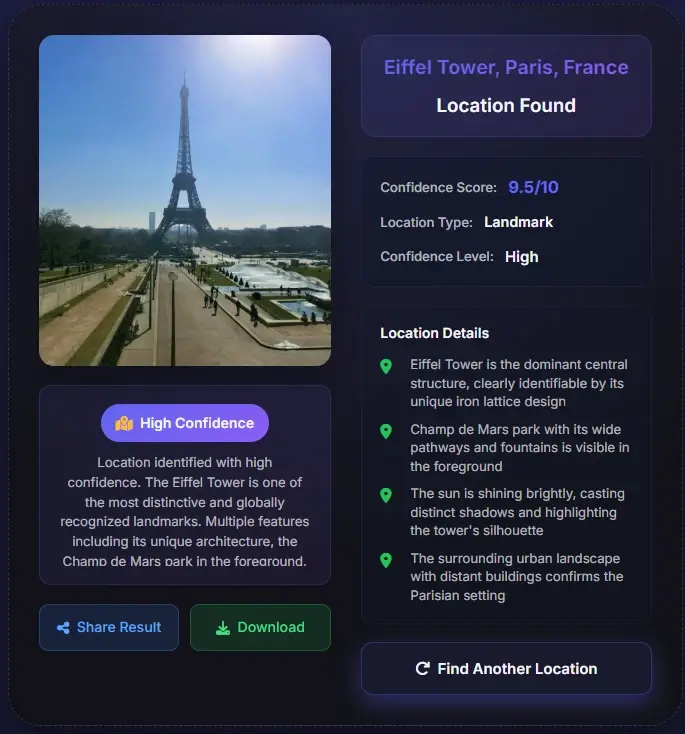
- Upload your photo — drag and drop or click to select
- The AI analyzes visual elements: landmarks, architecture, vegetation, signage, terrain
- Within seconds, you receive a location result with a map pin and confidence level
- Cross-reference with Google Maps or Street View to confirm
Best suited:
- Photos downloaded from social media (no EXIF data)
- Old or historical photographs
- Scenic landscape photos with no obvious landmarks
- Verifying the claimed location of a news or social media image
- Travel inspiration — finding the exact spot in a beautiful photo
Method comparison at a glance
| Method | Works Without GPS? | Works on Social Media Photos? | Speed | Best For |
|---|---|---|---|---|
| EXIF Metadata | No | Rarely (stripped) | Instant | Your own unedited photos |
| Visual Clue Analysis | Yes | Yes | Minutes to hours | Investigative work, historical photos |
| Reverse Image Search | Yes | Yes | Seconds | Photos published online before |
| AI Location Finder | Yes | Yes | Seconds | Any photo — the most versatile method |
How AI Analyzes Photos to Determine Location
The science behind AI photo geolocation is fascinating — and it goes far deeper than simple landmark recognition. Modern systems are trained on tens of millions of GPS-tagged images, learning to recognize patterns that would take a human investigator years to master.
The field was transformed by a landmark 2008 paper called IM2GPS by researchers James Hays and Alexei Efros, who demonstrated that scene matching across a database of 6 million GPS-tagged images could estimate photo locations with surprising accuracy. That research laid the groundwork for every modern AI geolocation system.
What the AI actually looks for
Building materials, window shapes, roof styles, and construction techniques vary significantly by region and era.
Tree species, grass types, and plant density are strong geographic indicators — a eucalyptus grove looks very different from a Nordic pine forest.
Lane markings, guardrail designs, utility poles, and road surface materials all follow regional standards.
The quality of natural light, haze levels, and sky color can indicate latitude, climate zone, and even season.
Even partially visible text, logos, or writing systems help narrow the location dramatically.
Mountain profiles, rock types, coastline shapes, and soil color are geographically distinctive.
The AI combines all these signals simultaneously — the same way an experienced traveler might instinctively recognize a place from a single glance — but with the processing power to cross-reference millions of reference images in milliseconds.
Accuracy: How Reliable Are AI Location Finders?
AI photo geolocation has improved dramatically, but accuracy varies depending on the photo content, the tool used, and what 'accuracy' means in context. Here's what the research shows:
~99%
Famous landmarks
92%
Correct country (PIGEON model)
61%
Social media photos (arXiv 2025)
82%
Exact location (specialized models)
| Photo Type | Typical Accuracy | Notes |
|---|---|---|
| Famous landmark (Eiffel Tower, Colosseum) | ~99% | Near-instant identification |
| Urban street scene with signage | 75–90% | Text and architecture provide strong signals |
| Social media selfie with background | ~61% | Per 2025 arXiv research on VLMs |
| Rural landscape, no landmarks | 40–65% | Vegetation and terrain are key signals |
| Indoor photo, no windows | 15–30% | Very limited visual geographic signals |
Keep in mind
Accuracy depends heavily on photo content. A photo of the Eiffel Tower will be identified instantly with near-100% confidence. A photo of a generic suburban street with no distinctive features is much harder — even for humans.
What independent research shows
- A 2025 study published on arXiv found that AI vision-language models achieve 61% accuracy on social media-style images — a significant privacy concern given how casually people share photos online.
- Bellingcat, the investigative journalism organization, tested 24 AI models on geolocation tasks in June 2025 and found ChatGPT o4-mini-high performed best overall.
- Specialized geolocation models like PIGEON (Stanford) correctly identified the country in 92% of test cases, with 40% of results accurate to within 40km.
- A compact specialized model benchmarked in late 2025 achieved 97% accuracy on wide-field-of-view images and 82% precision on exact location pinpointing.
Privacy & Safety: What You Should Know
The same technology that helps you find a beautiful travel destination can also reveal your own location from a photo you posted online — often without you realizing it. Understanding this is important for anyone who shares photos on social media.
The privacy risk is real
In 2025, GeoSpy AI — a tool originally designed for law enforcement and OSINT investigators — demonstrated that it could pinpoint a person's location from a single selfie, even without any GPS metadata. The tool analyzes background details: the view from a window, the style of a building across the street, the type of trees visible. This capability is now available in mainstream AI tools.
How to protect your location privacy
Use a free tool like ExifTool or your phone's built-in privacy settings to remove metadata before uploading photos.
Distinctive landmarks, street signs, or recognizable views in the background of a photo can reveal your location even without GPS data.
Most social media platforms strip EXIF data automatically, but this doesn't protect against visual geolocation from the image content itself.
Photo geolocation is a powerful tool for discovery and verification. Using it to track individuals without their consent raises serious ethical and legal concerns.
A note on ethics
Photo geolocation technology is a tool — like any tool, its ethics depend entirely on how it's used. Finding the location of a travel photo for inspiration is wonderful. Using it to track someone's movements without consent is not. Always consider the human on the other side of the image.
How to Cross-Check a Photo Location Result
Treat every location result as a hypothesis until the visible scene matches real-world evidence. A reliable answer usually survives at least two independent checks.

Match fixed geometry
Compare road curves, bridge angles, building spacing, mountain lines, coastline shape, and landmark orientation.
Validate text and local rules
Signs, license plates, lane markings, utility poles, shop names, and scripts often confirm the country or city.
Check time-sensitive clues
Construction scaffolding, seasonal vegetation, shop closures, and event banners can explain differences from current Street View.
Best practice
Save the likely location, the clues that support it, and the uncertainty level. That record is more useful than a bare map pin.
The Answer Is Usually Closer Than You Think
Finding where a photo was taken used to require either luck (GPS data was there) or expertise (you recognized the location). In 2026, AI has changed that equation entirely. Whether you're a curious traveler, a family historian, a journalist, or just someone who saw a beautiful photo and wants to know where it is — the tools are now accessible, fast, and remarkably accurate.
Start with EXIF data — it's instant when it works. If that fails, try AI geolocation first before spending time on manual analysis. The combination of these methods means that very few photos are truly unlocatable today.
Frequently Asked Questions
About the author
Sophie Laurent
Travel writer & AI technology journalist
Sophie Laurent is a Paris-based travel writer and technology journalist with over a decade of experience covering AI, digital photography, and open-source intelligence. Her work has appeared in major tech and lifestyle publications across Europe and North America. She is passionate about the intersection of travel, storytelling, and emerging technology.
References & Sources
- Wikipedia — Exchangeable image file format (EXIF) nofollow
- Bellingcat — Have LLMs Finally Mastered Geolocation? (June 2025) dofollow
- TechCrunch — The latest viral ChatGPT trend is doing 'reverse location search' from photos (April 2025)
- arXiv — Assessing the Geolocation Capabilities, Limitations and Societal Risks of Generative Vision-Language Models (2025)
- GeoSpy AI — GeoSpy 101: What Is GeoSpy? (2025)
Last updated: August 14, 2026