How to Find a Building Location from a Photo: 7 Checks That Work
A practical guide for turning signs, architecture, street layout, maps, and AI clues into a verified building location.

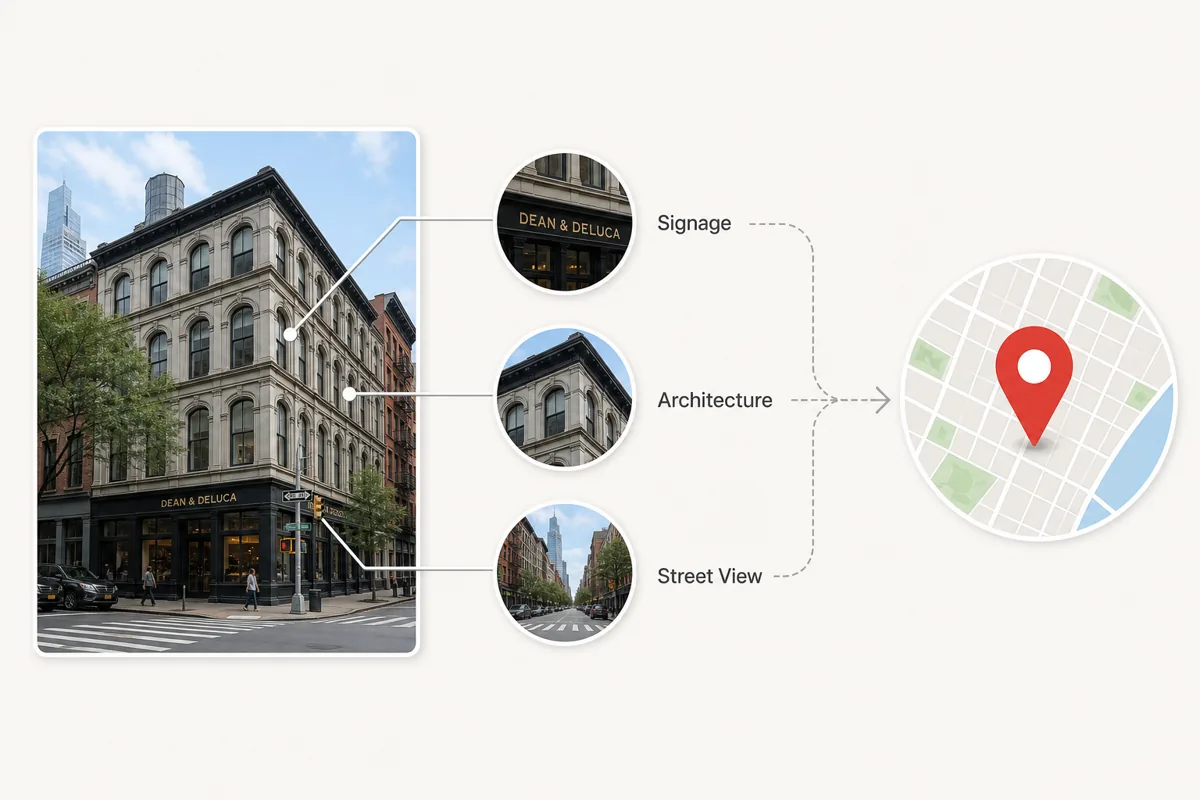
Table of Contents
- Quick Workflow: From Building Photo to Verified Location
- The Building Clue Matrix
- Use Google Lens and Reverse Image Search Correctly
- Verify the Building in Maps and Street View
- When AI Geolocation Helps
- Privacy, Safety, and Ethical Limits
- Common Mistakes That Lead to Wrong Matches
- Frequently Asked Questions
If you have a photo of a building but do not know where it is, start by treating the image as evidence rather than a mystery. A facade, window rhythm, storefront sign, street corner, road marking, or background skyline can narrow the search faster than a broad web query. This guide focuses on building photos specifically: how to extract clues, use Google Lens and reverse image search, compare architecture, verify the result on maps, and know when AI geolocation is useful or risky.
Quick Workflow: From Building Photo to Verified Location
Use this order when you need a fast answer. It keeps you from jumping to a false match just because one building looks similar.
- Save the highest-resolution version of the photo and crop around the building only if the original remains available.
- Check EXIF metadata first if you own the original file; GPS coordinates are the fastest answer when present.
- Run Google Lens or another reverse image search on the full scene, then on details such as signs, logos, towers, or unique windows.
- List visible clues: language, shop names, road signs, license plate style, architectural era, street layout, and nearby landmarks.
- Open candidate locations in maps and compare the facade, roofline, neighboring buildings, road angle, and Street View perspective.
- Use AI geolocation to generate additional hypotheses, then verify them with the same map evidence.
Rule of thumb
A location is not verified until fixed geometry and at least one independent clue match the real place.
The Building Clue Matrix
Buildings carry many geographic signals. Some identify the exact venue, while others only narrow the country or city. The table below shows which clues are worth checking first.
| Clue | What to inspect | How it helps |
|---|---|---|
| Signage and text | Store names, street signs, transit stops, warning labels, scripts | Can reveal language, city, business name, or exact street. |
| Architecture | Window shape, facade material, roof style, balconies, fire escapes | Narrows the region, age of the building, and sometimes the neighborhood. |
| Street geometry | Corner angle, lane count, crosswalk style, curb shape | Useful for confirming the exact map position. |
| Neighboring buildings | Facades on both sides, skyline, towers, murals | Prevents false matches when many buildings look similar. |
| Local infrastructure | Traffic lights, utility poles, license plates, road markings | Often confirms country or city standards. |
Use Google Lens and Reverse Image Search Correctly
Google Lens, Bing Visual Search, Yandex Images, and TinEye can identify famous buildings or find copies of the same photo online. They work best when the building has appeared on travel sites, business listings, real estate pages, social media, or news articles.
Do more than one search. Try the uncropped image first, then crop the storefront sign, a distinctive tower, a statue, a logo, or a street sign. Cropping removes visual noise and can surface matches that the full photo misses.
Best for exact matches
Use TinEye or reverse image search when you suspect the same photo was published before.
Best for visual similarity
Use Google Lens or Bing Visual Search when the exact image is not indexed but the building is visually distinctive.
Best for regional gaps
Try Yandex Images when other engines miss Eastern European, Central Asian, or Russian-language sources.
Verify the Building in Maps and Street View
Once you have a candidate address, open it in Google Maps, Apple Maps, or another map service and compare fixed features. Street View is especially useful because it lets you match the camera angle, not just the building name.
Look for elements that do not change easily: the number of window bays, the corner shape, the position of doors, nearby intersections, roofline, sidewalk width, and the order of neighboring storefronts. Temporary signs, parked cars, scaffolding, and seasonal vegetation may differ, so do not reject a good match for those alone.
Verification test
If the building facade, street angle, and neighboring structures all match, the location is much stronger than a single reverse-search result.
When AI Geolocation Helps
AI can help when metadata is gone and reverse image search returns nothing. A good AI photo location tool analyzes architecture, signs, vegetation, road markings, lighting, and background context to propose candidate locations.
Use AI as a hypothesis generator, not as the final authority. Ask what clues support the result, compare those clues on maps, and keep uncertainty visible when the photo lacks clear landmarks.
| Situation | Best first method | Reason |
|---|---|---|
| Original phone photo | EXIF/GPS check | Coordinates may still be embedded in the file. |
| Famous building or storefront | Google Lens or reverse image search | The building may already be indexed online. |
| Unknown street facade | AI geolocation plus map verification | AI can suggest areas, but Street View must confirm. |
| Old scanned print | Manual clues and historical maps | Metadata is absent and current streets may have changed. |
Privacy, Safety, and Ethical Limits
Do not use building geolocation to expose a private home, track a person, or identify someone’s routine without consent. A photo of an apartment entrance, school, office, or hotel can reveal sensitive location information even when GPS metadata has been removed.
If you are checking your own photo before posting, remove EXIF metadata and crop out street signs, house numbers, or distinctive windows when location privacy matters. If you are verifying a public claim, document the evidence and avoid publishing unnecessary personal details.
Common Mistakes That Lead to Wrong Matches
The biggest mistake is accepting the first visually similar result. Many cities have repeated architectural styles, chain storefronts, and similar corner buildings. Another common error is matching a business name without checking whether that business has multiple branches.
Also watch for mirrored images, old Street View captures, renovations, and photos taken from inside vehicles. These can make the real scene look slightly different from the map view.
False friend
A similar facade in the right city is not enough without matching neighboring buildings.
Chain locations
Restaurant and retail signs often exist at many addresses, so compare the street layout too.
Outdated imagery
Street View may be years old; confirm with multiple map layers or recent web photos when needed.
Use AI After You Gather the Clues
When the building is not famous or the photo came from social media, upload it to WhereIsThisPhoto after you note the visible clues. The tool can suggest likely places, but you should still verify the match with maps and the checklist above.
Frequently Asked Questions
References & Sources
Last updated: June 18, 2026
Read the complete photo location guide